


Online Banking
With a consistent look and feel across devices, banking anytime, anywhere has never been simpler.
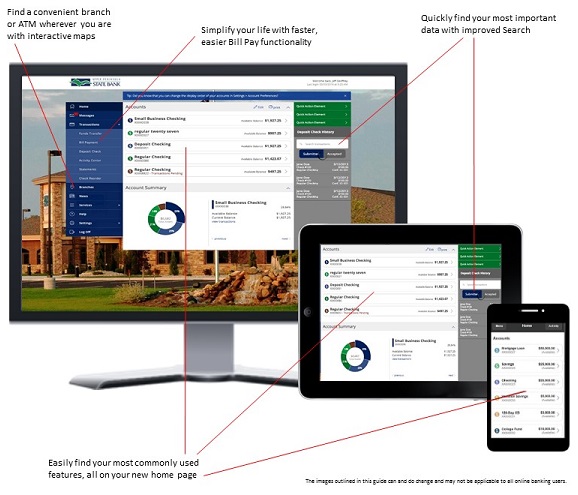
Whether it's checking your balances, paying your bills, making deposits or finding a nearby ATM while you're out and about, our online banking experience can help you save time so you can enjoy what matters most to you.
How to Get Started
Not enrolled in Online Banking yet? The process is simple, just follow the steps below to get started!
Complete the Enrollment Form. Located in the upper right-hand corner of our webpage, you will see links to our Internet Banking platform. Click on "Enroll". Complete the online enrollment form and click "Submit Enrollment".
Verify your information with a banker. For security purposes, one of our bankers will contact you within 24 - 48 hours to verify the information you provided. Once that is complete, you will receive an email from us with login instructions.
- Login to the system. Using the login instructions provided in the email from us, login to Online Banking and enjoy!
Please note - if you are going to be logging in from a tablet of smart phone you will need to download our free mobile banking app.
Mobile Banking App
Enjoy the convenience of banking on the go with Upper Peninsula State Bank's Mobile Banking App.
It's secure, free* and accessible from any mobile device. Go to your mobile app store, search for Upper Peninsula State Bank and download the app - it's that easy!
With our Mobile Banking App you can:
- View account balances
- See transaction history and view check images
- Transfer funds between accounts
- Pay bills using "My Bill Pay"
- Make Deposits
- Locate our branches and ATMs
- Contact us at the touch of a button
*Connectivity and usage rates may apply. Contact your wireless service provider for more details.
System Requirements
We think you will enjoy our online banking product. With the flexibility to do your banking on any device you choose, life can become that much easier for you. To experience all the enhancements and benefits of our online banking product, there are some minimum requirements that your device will need to have.
Please note - the preferred method for accessing online banking on a tablet or mobile device is to use our free mobile banking app. Browser logins on a tablet or mobile device does not offer app features such as Mobile Remote Deposit Capture (mRDC) and Biometric login options.
Haven't tried it yet? You're missing out!
Enroll today and see why - "You're going to like it here!"
You are leaving Upper Peninsula State Bank's website.
You are about to follow a link to [Link].
This link is provided for your convenience. Please note that this website is not controlled by Upper Peninsula State Bank or subject to our Privacy Policy. To proceed, click 'continue' below. To remain on our site, click 'cancel' below.